#IWSG – Writing Gems

It’s time for yet another Insecure Writer’s Support Group post of 2024, and more adventures, these canines.

Moving house has been ruled out due to financial constraints, which feels crazy having owned a brick-and-mortar house with a three-car garage until two years ago. At least we bought my wife’s three sons’ homes before the money began drying up.

Fortunately, I can sometimes distract myself from our financial and health issues by attempting to focus on writing. My Ukraine saga, Freedom Flights, still helps the most. On Monday, July 1st, I posted the 3rd and last part of Episode 23, β€˜Witches Troupe’, with a format change I hope is apparent… as I’ve made it a permanent change. Hopefully, it’s noticeable.

Slava Ukrayini

The greatest change in our house has been canine.

On June 17th last year our special fur baby Quetzal passed away, and I struggled to come to terms with her loss for months. I wrote part 1 of her tribute but failed to write part 2… even though I still miss her.

In late March we acquired an Aussiedoodle puppy called Blondie… full name Windsong Blondelle Phoenix. She was adorable though too large to have her jumping on my bed, especially when she landed hard on my legs. Over time it became apparent that we couldn’t give a large one-year-old dog the right attention. Fortunately, Shaunna, one of our caregivers with the previous company, helped us with her, even having Blondie stay one of the nights Juanita was in the hospital.

Taika (R) and his brothers

Last Friday, Juanita bought me a cute 6-week old Beagalier puppy, who we’ve called Taika – Maori for β€˜tiger’. He’s pure energy with sharp nails which my scratched arms and chest are evidence of. And he scrambles all over my desk, desperate to chew my water jug’s straw. Whether he’ll ever be as calm as Quetzal, remains to be seen.

And Blondie met him for a few hours before she moved to her new home with Shaunna, her large dogs – already friends – and her family.

**

Every month, IWSG announces a question that members can answer in their IWSG posts. These questions may prompt you to share advice, insight, a personal experience, or a story. Include your answer to the question in your IWSG post or let it inspire your post if you are struggling with something to say. 

Remember, the question is optional!

July 3 question – What are your favorite writing processing (e.g. Word, Scrivener, yWriter, Dabble), writing apps, software, and tools? Why do you recommend them? And which one is your all time favorite that you cannot live without and use daily or at least whenever you write?

When I started writing, I used Wordstar but over the course of time I changed to Word. Almost all of my recent fiction exists as Word files, even those created in Scrivener. From about 2016 when we moved from North Wales to Idaho, USA, until June 2022, I worked on a desktop PC creating draft novels in Scrivener.

I found Scrivener to be a better programme than Word for assembling and keeping track of my novels’ elements such as characters, and locations, with the ease of moving scenes and chapters around.

I’m especially aware of this now that I work without my desktop on a laptop with only Word. I am acutely aware of this as I write Freedom Flights with its multiple locations and characters, and set between 1944 and the present day. I suspect it would cost me money I don’t have to install the newest Scrivener on my laptop.

For editing, I used an excellent online programme called Fictionary, which allows you to move scenes and chapters around, and assess things like flow, repetition, openings and endings, pace, etc. I used Fictionary to edit Fevered Fuse and it was effective. However, I let my sub lapse, so I haven’t loaded my Ukraine project onto it yet.

I use other software like Grammarly and ProWriting Aid to improve my writing, although Word is my Number One writing gem, my all-time favourite. Β Β Β Β Β Β Β Β Β Β Β Β Β Β Β Β Β Β Β Β Β Β Β Β Β Β Β Β Β Β Β Β Β Β Β Β Β Β Β Β Β Β Β Β Β Β Β Β Β Β Β Β Β Β Β Β Β Β Β Β Β Β Β Β Β Β Β Β Β Β Β Β Β Β Β Β Β Β Β Β Β Β Β Β Β Β Β Β Β Β Β Β Β Β Β Β Β Β Β Β Β Β Β Β Β Β Β Β Β Β Β Β Β Β Β Β Β Β Β Β Β Β Β Β Β Β Β Β Β Β Β Β Β Β Β Β Β Β Β Β Β Β Β Β Β 

Hope my format change works.

**

The awesome co-hosts for the July 3 posting of the IWSG areΒ JS Pailly,Β Rebecca Douglass,Β Pat Garcia,Β Louise-Fundy Blue,Β andΒ Natalie Aguirre!

Finally, don’t forget to visit more active writers via the IWSG site:

Insecure Writer’s Support Group

Let’s rock the neurotic writing world!

Our Twitter handle is @TheIWSG, and our hashtag is #IWSG.

Purpose: To share and encourage. Writers can express doubts and concerns without fear of appearing foolish or weak. Those who have been through the fire can offer assistance and guidance. It’s a safe haven for insecure writers of all kinds!


Posting: The first Wednesday of every month is officially Insecure Writer’s Support Group Day. Post your thoughts on your own blog. Talk about your doubts and the fears you have conquered. Discuss your struggles and triumphs. Offer a word of encouragement for others who are struggling. Visit others in the group and connect with your fellow writer – aim for a dozen new people each time – and return comments. This group is all about connecting!

Figuring out Fictionary


Fictionary-Logo-200-002-1

When I was approaching the final third of my fourth rewrite of Fates Maelstrom, I felt that I had β€˜lost the plot’. I wasn’t sure what to do until I was introduced to the online editing tool Fictionary by their CEO and lead developer, mystery writer Kristina Stanley who said it might help.

Although my draft wasn’t finished, the rewrite in Scrivener had the final third of draft three as guide notes. Fictionary showed me how to create and upload a docx file from Scrivener.

From that file, Fictionary automatically generated the following overviews:

  • Story Arc
  • Word Count per Scene
  • Scenes per Chapter
  • Characters per Scene
  • Scenes Per Character
  • Point of View

Before I could start using the editing features, I was prompted to confirm my cast of thousands – well almost two hundred. Many of these were characters mentioned but who never appeared like ancestors and other relations.

WARNING: I made the error of deleting the ones that seemed minor – as well as names of mentioned authors like Agatha Christie, and I deleted names like Ford and Guinness. At this stage, variations/mis-spellings of a character’s name come up as different characters, so you can correct that – or note the errors.

Here’s a screenshot of part of my Cast List.

2018-02-08

The Character function proved cleverer than me as in every scene you can select β€˜Characters in the scene’ and β€˜Characters mentioned’, but only the former is used for analysis in the above Overviews and the other β€˜Visualize’ reports. Next time, I won’t be deleting those β€˜unimportant’ names since they can help as well – I’ve had to add them back in.

This Cast list also shows where characters have similar names, so those clashes might be worth changing.

I like the way in Fictionary that as you evaluate each scene, the visualisation of your novel grows. I have only worked through some aspects of my scenes to tackle what I need to do, but that was enough to demonstrate the potential available.

In the words of Fictionary:

Fictionary helps you evaluate and edit your manuscript until you are satisfied your story works. TheΒ VisualizeΒ page lets you see your story like never before with automated reports such as theΒ Story Arc.

TheΒ EvaluateΒ page helps you consider key elements of fiction forΒ Character, Plot, and SettingΒ on a scene-by-scene basis. As you capture information for each element, Fictionary builds out yourΒ Story MapΒ report.

You’ll alternate betweenΒ VisualizeΒ andΒ EvaluateΒ until you’re happy with every scene in your manuscript. When your Fictionary edit is complete, you canΒ ExportΒ your manuscript back to Word.

Hence, the following reports required me to consider and add information on my manuscript when I was evaluating my scenes:

  • Story Map
  • Scenes Opening / Closing Types
  • Purpose of Scene
  • Setting Elements Per Scene

As I said, I haven’t evaluated every element in many scenes but at a glance, the Visualize page began to show potential problems with my draft so I had to make some immediate amendments to lend some sense to my chaos.

Let’s go back to my first shock – the cast of thousands. There was one omission – my main protagonist called Sparkle. Computer programmes get fooled by ordinary nouns as proper names – I know of a writer called Rose who has that problem with Dragon Naturally Speaking. Once Sparkle was recognised, I got this POV chart:

2018-02-08 (2)

Visualize is showing the three main POVs, my progress in confirming their scenes, the number of scenes they are in,Β  the percentage for each POV and at the bottom the scenes in novel order with the POV character identified. Ignore the POVs with two or less scenes as they are news reports or similar. From overviews like this, I began to see how I could take one POV character, Brogan Keyes – the purple column – and without losing the character, I could envisage a better plotline unfolding.

On the left of this Fictionary screenshot, you can see a list of all the elements that you can show reports on – too many to assess individually here. Let’s look at one of the main ones – the Story Map. This is where all your evaluated details end up, generating an overview that has so many applications. Ultimately it will help you see where the manuscript can be improved as you edit.

2018-02-08 (3)

There is a choice between the Full Story Map or just a selection as I have here. If I want, I can identify all the missing elements that are easy to fill in – like Scene Name, Location, and Date. The more information that I β€˜identify’, the better the visualisation and the better my edit.

Adding scene names in the messed up third of the novel has already help me visualise how the plot is unfolding. I had created an Excel breakdown of the first half of the novel and was about to create an Aeon Timeline file as well, but Fictionary is creating a better variation, especially as the programme encourages me to assess each scene.

When I did the first Fictionary pass, I identified all the POV goals and every scene’s purpose – on Kristina Stanley’s recommendation. This proved to be a valuable step in identifying scenes that could be tightened or removed.

My Story Map has many blanks still, so I will be using the other elements to assess my manuscript, but I am already making a lot of sense of the novel with the help of Fictionary.

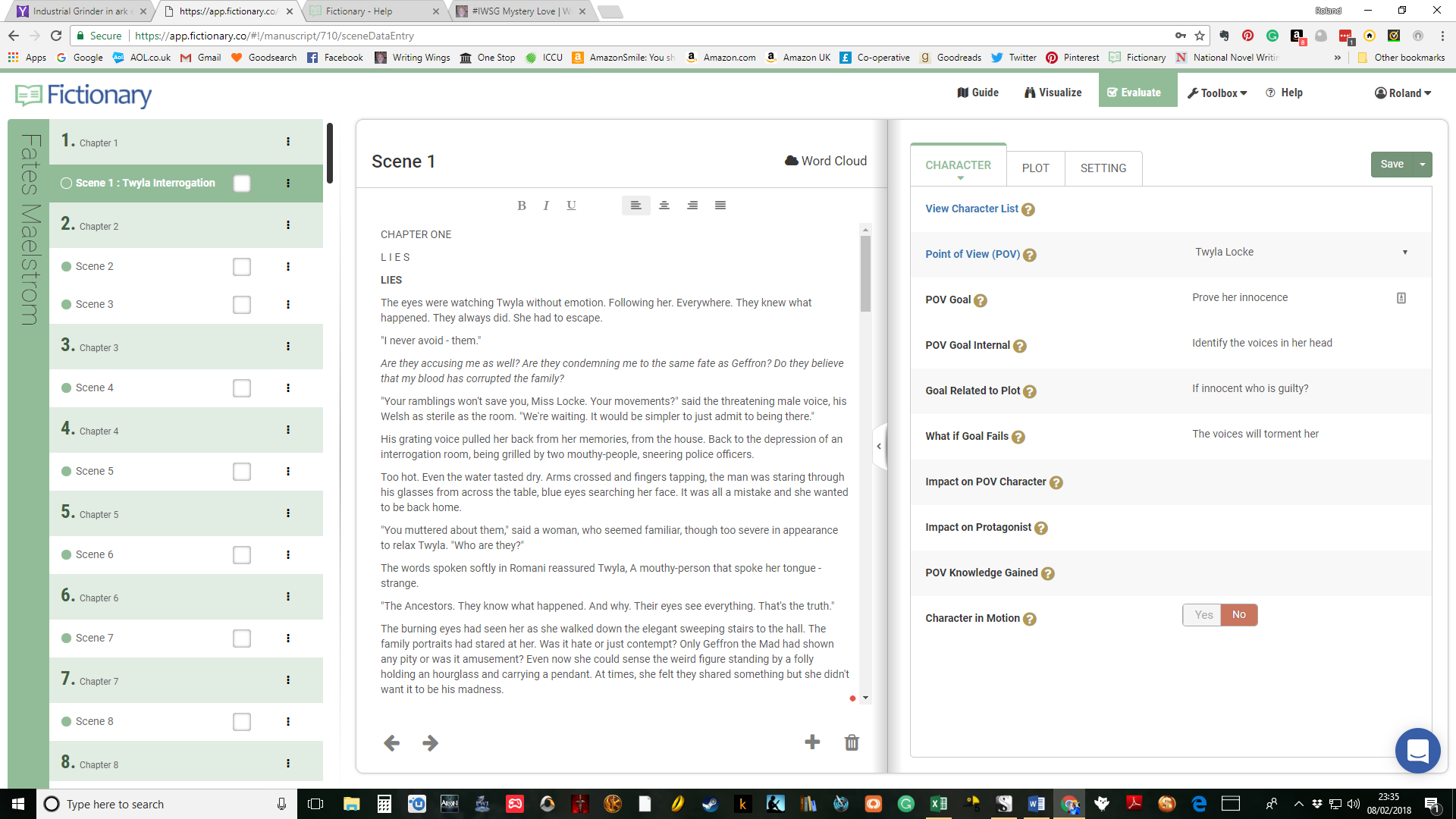
Here’s my opening scene on the Evaluation page, showing the text in the middle where you do the edits, the manuscript scene list on the left, and the key element tabs that feed the Story Map on the right.

2018-02-08 (4)

Please note that my scenes weren’t in chapters in Scrivener, only headings, so Fictionary created a Chapter for each scene – except when I had two or more scenes under one heading so that correctly became one chapter.

At most stages, there are quick ways of checking elements in a scene like here with ‘characters involved’ or ‘mentioned’ via the View Characters button. If there isn’t a way in-scene then I go to Visualize and try there. When you move between Visualize and Evaluate, those β€˜tabs’ remain on what you were last looking at – andΒ they update if you press the Save button.

Even with this scene, I have yet to complete every element but now that I know where I am going, I can rewrite the novel with the help of all the Fictionary tools. I have the choice to edit the draft in Fictionary and then export my finished manuscript, or if there are major changes go back to Scrivener as I’m doing.

This has been a mere glance at what this software offers, but I will continue to use it and learn about it along the way. Sometime in the near future, I will write another post about my experiences Figuring out Fictionary.

Bugs? More like omissions that are likely to be fixed. Sometimes I found missing aspects, but that is where being involved in an ongoing piece of software is so good. The developers are open to suggestions on things to add. Like one cool feature: from some Visualize reports you can activate a pop-up of the scene concerned. There were some places where I wanted this feature, but it wasn’t available – well not yet. When I asked about or suggested something, the change was either coming or my suggestion would be taken on board.

Another feature that would help, is being able to move scenes around. I do this quite often in Scrivener and the process works well. In Fictionary, I must create a blank scene then cut & paste – slower but it works. Again, that’s a suggestion that was taken on-board.

Beyond the guides on site, there are regular articles posted or sent to subscribers – like this post on The Purpose of a Scene:

https://kristinastanley.com/2018/02/08/ensure-the-purpose-of-a-scene-is-engaging-your-readers/

To get a taste of this online editing tool, you can sign up for a free 10-day trial as I did initially. Then you upload your 50,000+ word manuscript and start your Fictionary story edit.

And if you sign up by February 18th, 2018, you will be automatically entered in The Fictionary Finish Your Novel Contest hosted in partnership with FriesenPress.

Grand Prize – One lifetime Fictionary subscription and a $1999 FriesenPress Publishing Package.

Additional Prizes: $200 annual Fictionary subscription for 3 luckyΒ writers!

Check out the details to enter the contest and check out this recommended online editing tool, Fictionary.

Four stars for this evolving software and five stars for the support team.

Fictinary_contest

A Day Late and Dollars Short

cdd86cfe83966ea55f47199e5c68402b

This should have been posted yesterday, but I forgot what day it was. In fact, on Sunday I still thought it was Saturday. So, I lost a day somewhere.

If you find that missing day, please let me have it back. I’m missing it terribly. πŸ˜‰

As for the mislaid dollars, well my brother did give me some money. However, his version of money is limited – by some camel with a needle aversion. I can’t really complain as I got enough to cover Christmas, or whatever holiday we choose to celebrate in wet and windy Wales.

As I warned my not-so-wise sibling, the price of everything is going up, and January will probably bring bigger price-hikes. Meridian, the place we are trying to move to, just got voted the Best Place to Live in America, Β byΒ 24/7 Wall St., an online financial news corporation. Already, suitable wheelchair-accessible houses are selling within 48 hours of going on the market. And the price will have a knock-on effect in the Treasure Valley area.

His excuses for not advancing the money to buy, are getting lamer every time we talk. The property to finance this has sold, for a considerable amount – millions – and my share covers my requests, and more. But he can always justify dragging his knuckles.

Maybe, after Christmas, there might be real news – or NOT.

ba377b97d389d50ac8585d2bb4bd3e43

There are also things missing on the writing front. Not exactly days – although the timeline of the story is a challenge – nor dollars, or pounds; could do with the Royalties though. Instead, having been a 2015 NaNoWriMo winner, the wheels are spinning.

I was working to an outline, but then I killed off a second character. Now, my detectives are all over the place, searching for evidence and scenes. Which means that the outline has to be re-thought before the Chief Constable closes down the investigation, and I’m left with a cold case. Or should that be a cold novel?

So great is my stressed-out confusion, that I’ve even re-installed Scrivener, believing that I missed a trick or two by abandoning it. Well, it did lose another novel – but I had an RTF backup for that.

Rant over. Off to plot another brutal murder – MUAHAHAHAHA.

2e73bfe5c0a7d9c35ba7e2ac72c2202c

http://epicpix.com/brutus-is-at-it-again/